


Most side‑hustle books don't break because people are lazy. They break because the month‑end entries nobody warned you about — the tax provision, the Stripe fee split, the chargeback that landed three weeks late — pile up until the ledger stops matching the bank. Then you're staring at a $43.18 difference at 11pm with no idea which month it came from.
This is the practical layer under the percentage rules and reconciliation cadence in the side‑hustle cashflow system for taxes, owner pay, and reinvestment. That post tells you how much to move. This one tells you exactly what to post so the numbers tie out and you'd survive an audit without a panic.
Everything here is copy‑paste ready: the journal entries with real numbers, an 18‑account chart you can import, a template layout, a file‑naming checklist, and a short troubleshooting table for the mismatches that actually happen.
The 18‑account chart of accounts (import this first)
Before any journal entry makes sense, you need accounts to post them to. The mistake most people make is building a 60‑account chart because QuickBooks suggested it, then never using 45 of them. A one‑person hustle needs fewer accounts than you think. Eighteen covers taxes, owner pay, merchant fees, accruals, and refunds without clutter.
Save this as chartofaccounts.csv and import it into your ledger tool or drop it into a spreadsheet tab:
| Account_Number | Account_Name | Type | Statement | Statement_Row |
|---|---|---|---|---|
| 1000 | Business Checking | Asset | BS | Current Assets |
| 1010 | Tax Reserve Account | Asset | BS | Current Assets |
| 1200 | Accounts Receivable | Asset | BS | Current Assets |
| 1300 | Undeposited Funds (Merchant Clearing) | Asset | BS | Current Assets |
| 2000 | Accounts Payable | Liability | BS | Current Liabilities |
| 2100 | Sales Tax Payable | Liability | BS | Current Liabilities |
| 2200 | Income Tax Provision Payable | Liability | BS | Current Liabilities |
| 2300 | Payroll Liabilities | Liability | BS | Current Liabilities |
| 2400 | Accrued Expenses | Liability | BS | Current Liabilities |
| 3000 | Owner Equity | Equity | BS | Equity |
| 3100 | Owner Draws | Equity | BS | Equity |
| 3200 | Owner Contributions | Equity | BS | Equity |
| 4000 | Sales Revenue | Revenue | PL | Revenue |
| 4100 | Refunds and Chargebacks | Revenue | PL | Contra-Revenue |
| 5000 | Merchant Processing Fees | Expense | PL | Operating Expenses |
| 5100 | Contractor and Payroll Expense | Expense | PL | Operating Expenses |
| 5200 | Software and Subscriptions | Expense | PL | Operating Expenses |
| 6000 | Income Tax Expense | Expense | PL | Below the Line |
A couple of notes worth knowing before you start posting:
-
1300 Undeposited Funds (Merchant Clearing) is the single most important account most people skip. It holds the gap between "customer paid" and "money hit my bank." Without it, your merchant fee splits never reconcile cleanly.
-
4100 Refunds and Chargebacks is contra‑revenue, not an expense. Netting refunds against sales directly hides your real gross and makes your tax provision wrong.
-
2200 vs 6000 — the Payable is what you owe, the Expense is what you booked. Keeping them separate is what lets you see your reserve balance at a glance.
A couple of notes worth knowing before you start posting:
The seven month‑end entries, with numbers
Each entry below uses the account numbers from the chart above. Debits first, then credits — same as you'd type them into any ledger. The dollar figures are illustrative but intentionally uneven, because real numbers never land on clean hundreds.
Take charge of your finances with clarity and confidence.
Savioly gives you real-time visibility and actionable steps to improve your money management.
- Automated expense tracking
- Goal-based saving plans
- Personalized financial insights
No credit card required
1. Tax provision (the one people forget until April)
You pulled in roughly $6,400 in revenue this month and your blended reserve rate is 27%. Set aside the provision now instead of discovering the hole at year‑end.
Dr 6000 Income Tax Expense 1,728.00 Cr 2200 Income Tax Provision Payable 1,728.00
Then physically move the cash so the reserve isn't fictional:
Dr 1010 Tax Reserve Account 1,728.00 Cr 1000 Business Checking 1,728.00
Supporting doc to attach: your reserve‑rate calculation (even a one‑line note: "27% of $6,400 net taxable") and the bank transfer confirmation. The split entry is what proves your tax money is real and not quietly funding your draws.
2. Owner draw / transfer
You pay yourself $2,000 this month out of checking.
Dr 3100 Owner Draws 2,000.00 Cr 1000 Business Checking 2,000.00
This is equity, not an expense — a draw never touches your P&L. A common mistake is coding owner pay to 5100 Contractor and Payroll, which inflates your expenses and understates your taxable profit. If you're a sole prop or single‑member LLC, your pay is a draw. Attach the bank transfer screenshot.
3. Accrual for unpaid invoices
You delivered work in the month but one $900 invoice is still unpaid at close. Accrual accounting means you book the revenue when earned, not when collected.
Dr 1200 Accounts Receivable 900.00 Cr 4000 Sales Revenue 900.00
When it pays next month:
Dr 1000 Business Checking 900.00 Cr 1200 Accounts Receivable 900.00
Attach: the invoice PDF. If you run cash‑basis — which most small hustles do — skip this one. Just be consistent. Mixing cash and accrual mid‑year is how reconciliations stop making sense.
4. Payroll liabilities
You paid a contractor $1,200 and withheld nothing (1099), but you also ran a small payroll for yourself as an S‑corp with $400 in withheld taxes you owe the agencies.
Dr 5100 Contractor and Payroll Expense 1,600.00 Cr 1000 Business Checking 1,200.00 Cr 2300 Payroll Liabilities 400.00
The $400 sits in 2300 until you remit it. Clearing it when paid:
Dr 2300 Payroll Liabilities 400.00 Cr 1000 Business Checking 400.00
Attach: the payroll register or the 1099 contractor invoice plus proof of the tax deposit.
5. Merchant fee split (the entry that fixes most mismatches)
This is where side‑hustle books quietly fall apart. A customer pays you $500 through Stripe. Stripe keeps a $14.80 fee and deposits $485.20. If you only book the $485.20 that hit your bank, your revenue is understated by the fee amount every single time.
Book it in two parts. First, record the full sale into clearing:
Dr 1300 Undeposited Funds (Merchant Clearing) 500.00 Cr 4000 Sales Revenue 500.00
Then record the payout and the fee:
Dr 1000 Business Checking 485.20 Dr 5000 Merchant Processing Fees 14.80 Cr 1300 Undeposited Funds (Merchant Clearing) 500.00
Now your revenue shows the real $500, your fee expense is captured, and clearing nets to zero. Attach: the Stripe/PayPal/Square payout report for the period — the one that shows gross, fees, and net.
6. Refunds and chargebacks
You refund a $120 sale, and Stripe claws back a $25 chargeback plus a $15 dispute fee on another transaction.
Refund: Dr 4100 Refunds and Chargebacks 120.00 Cr 1000 Business Checking 120.00
Chargeback plus dispute fee: Dr 4100 Refunds and Chargebacks 25.00 Dr 5000 Merchant Processing Fees 15.00 Cr 1000 Business Checking 40.00
Keeping refunds in contra‑revenue (4100) instead of burying them in expenses gives you an honest net revenue line — which is the number your tax provision should actually be based on. Attach: the refund confirmation and, for chargebacks, the dispute notice.
7. Remediation of commingled funds
The one everybody has to do at least once: you paid a $180 personal grocery bill from the business checking by accident, and you covered a $220 business software charge from your personal card.
Fix the personal expense paid from business: Dr 3100 Owner Draws 180.00 Cr 1000 Business Checking 180.00
Fix the business expense paid personally: Dr 5200 Software and Subscriptions 220.00 Cr 3200 Owner Contributions 220.00
Treat the accidental personal payment as a draw and the business charge you covered as a contribution. This keeps the P&L clean and documents the correction. If separating business and personal cash is an ongoing problem, the lean separation rules in the side‑hustle cashflow system stop most commingling before it starts. Attach: both receipts with a short note explaining the correction.
The journal import template (layout + formulas)
Save this as journalimport.csv. Most ledger tools and every spreadsheet accept this exact shape. Each line is one side of an entry; the EntryID groups them.
| Entry_ID | Date | Account_Number | Account_Name | Debit | Credit | Memo | Attachment |
|---|---|---|---|---|---|---|---|
| JE-001 | 2025-01-31 | 6000 | Income Tax Expense | 1728.00 | Tax provision 27% of 6400 | reserve-calc.pdf | |
| JE-001 | 2025-01-31 | 2200 | Income Tax Provision Payable | 1728.00 | Tax provision | reserve-calc.pdf | |
| JE-002 | 2025-01-31 | 1010 | Tax Reserve Account | 1728.00 | Reserve transfer | bank-transfer.png | |
| JE-002 | 2025-01-31 | 1000 | Business Checking | 1728.00 | Reserve transfer | bank-transfer.png | |
| JE-003 | 2025-01-31 | 3100 | Owner Draws | 2000.00 | Monthly owner pay | draw-transfer.png | |
| JE-003 | 2025-01-31 | 1000 | Business Checking | 2000.00 | Monthly owner pay | draw-transfer.png | |
| JE-004 | 2025-01-31 | 1300 | Undeposited Funds (Merchant Clearing) | 500.00 | Stripe sale gross | stripe-payout.pdf | |
| JE-004 | 2025-01-31 | 4000 | Sales Revenue | 500.00 | Stripe sale gross | stripe-payout.pdf | |
| JE-005 | 2025-01-31 | 1000 | Business Checking | 485.20 | Stripe net payout | stripe-payout.pdf | |
| JE-005 | 2025-01-31 | 5000 | Merchant Processing Fees | 14.80 | Stripe fee | stripe-payout.pdf | |
| JE-005 | 2025-01-31 | 1300 | Undeposited Funds (Merchant Clearing) | 500.00 | Clearing net | stripe-payout.pdf |
Two formula checks to drop into a spreadsheet version so it polices itself:
-
Balance check (per entry)
=SUMIF(EntryIDrange, "JE-001", Debitrange) - SUMIF(EntryIDrange, "JE-001", Creditrange)should return0for everyEntry_ID. If it doesn't, that entry is lopsided. -
Global check
=SUM(Debitcolumn) - SUM(Creditcolumn)should equal0across the whole file before you import anything.
If either check is non‑zero, do not import. A single typo'd amount that imports is far harder to find than one you caught in the staging sheet.
Posting workflow: the order that avoids rework
The sequence matters more than people expect. Posting draws before you've booked merchant fees, for example, makes your checking balance look wrong mid‑close and sends you chasing a problem that isn't there.
-
Reconcile the merchant payout report first. Book every sale‑to‑clearing and payout‑to‑bank entry (entries 5 and 6) until clearing nets to zero.
-
Book revenue accruals for any delivered‑but‑unpaid invoices (entry 3).
-
Book expenses and payroll (entry 4), attaching each invoice.
-
Run the commingling cleanup (entry 7) so the P&L is clean before you calculate anything off it.
-
Calculate and book the tax provision off the now‑correct net revenue (entry 1), then move the cash (step 2 of that entry).
-
Book the owner draw last (entry 2), because you only want to pay yourself from what's actually left after reserves.
That last point is the quiet discipline that separates hustles that survive tax season from those that scramble: reserve before you draw, every month, without exception.
Here's a quick visual of the posting sequence if you prefer a workflow map:
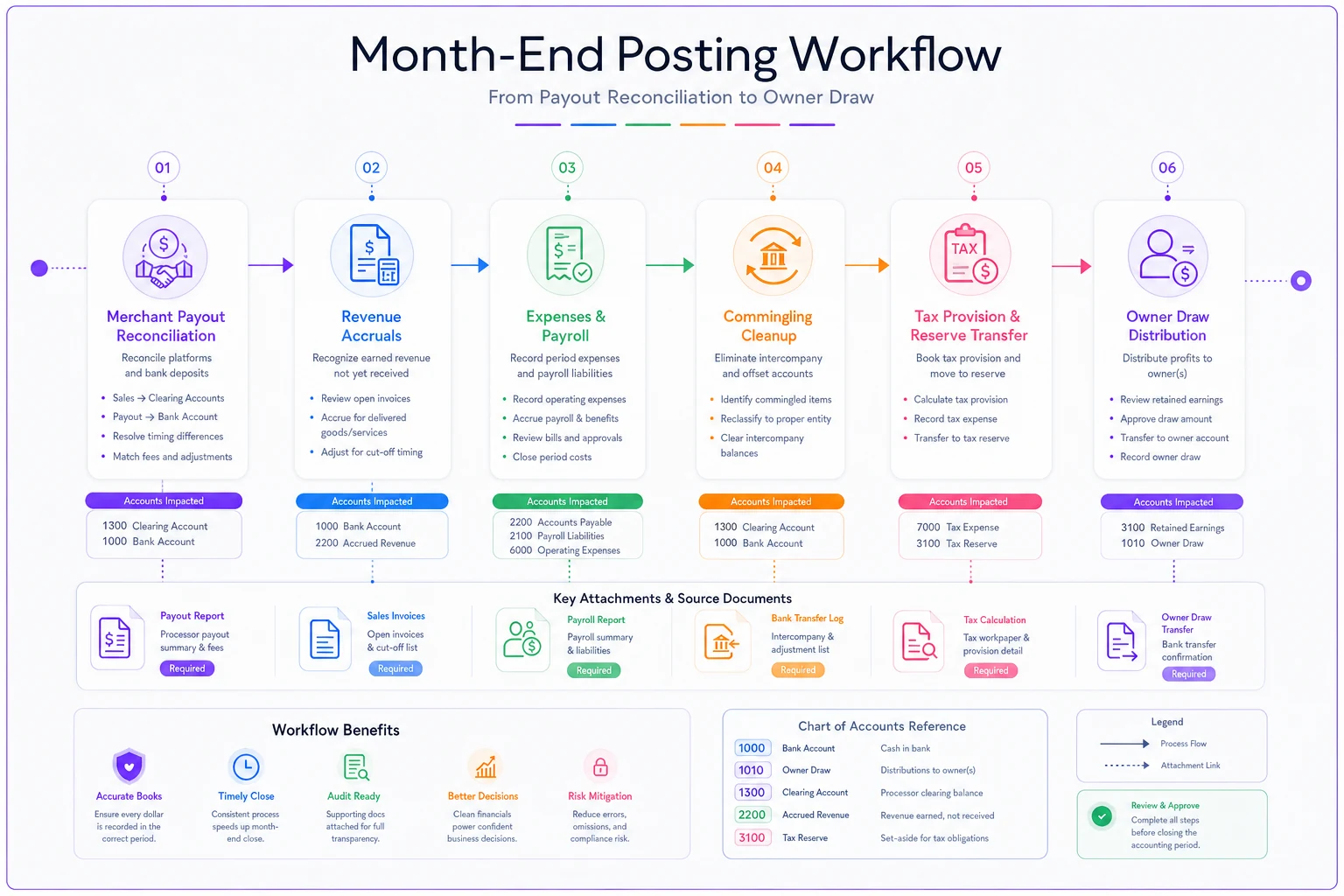
Post merchant payouts and clearing entries first so clearing nets to zero before other entries, which prevents chasing false balance issues.
That last point is the quiet discipline that separates hustles that survive tax season from those that scramble: reserve before you draw, every month, without exception.
Bank and merchant timing notes
The number‑one source of month‑end mismatches isn't math — it's timing. A sale on January 31 might not deposit until February 2. A chargeback for a December transaction might not show up until mid‑January.
-
Payout lag Stripe, PayPal, and Square typically deposit 2–3 business days after the charge. A late‑month sale lives in Undeposited Funds across the month boundary — that's normal, and it's exactly why the clearing account exists.
-
Chargebacks are retroactive. They almost always reference a sale from a prior month. Book them in the month they hit your bank, not the month of the original sale, and note the original date in the memo.
-
Refund settlement can take several days to clear your balance. If a refund is "issued" but hasn't cleared the bank by close, it stays in clearing or AP until it settles.
The number‑one source of month‑end mismatches isn't math — it's timing. A sale on January 31 might not deposit until February 2. A chargeback for a December transaction might not show up until mid‑January.
Troubleshooting common mismatches
The pattern across almost all of these: the entry was booked for what hit the bank instead of what actually happened. Book the economic event, split out the fees, and the bank catches up on its own schedule.
| Symptom | Likely cause | Fix |
|---|---|---|
| Bank is lower than ledger by a few dollars per sale | Merchant fees not split out; only net recorded | Rebook sales gross through 1300, expense the fee to 5000 |
| Revenue looks too low vs. payout reports | Refunds netted against sales instead of booked to 4100 | Reclass refunds into contra‑revenue 4100 |
| Clearing account won't net to zero | Late‑month sale deposited next month | Leave it in 1300; it clears next period — this is correct |
| Unexplained drop in checking late in month | Chargeback from a prior month | Book to 4100 + 5000, note original transaction date in memo |
| Tax reserve balance doesn't match provision | Expense booked (6000) but cash never transferred | Run the reserve transfer entry to 1010 |
| Profit looks inflated | Owner draw coded as payroll expense | Reclass from 5100 to 3100 Owner Draws |
The pattern across almost all of these: the entry was booked for what hit the bank instead of what actually happened. Book the economic event, split out the fees, and the bank catches up on its own schedule.
The month‑end folder: what to save and how to name it
Audit readiness is almost entirely about retrieval. If you can find the document in ten seconds, you're fine. If you can't, it doesn't matter that it exists somewhere on your hard drive.
Create one folder per month named YYYY-MMclose (e.g. 2025-01close) and save:
-
[ ]
YYYY-MM_bank-statement.pdf -
[ ]
YYYY-MM_merchant-payout.pdf(one per processor if you use more than one) -
[ ]
YYYY-MM_reconciliation.xlsx(your staging sheet with the balance‑check formulas) -
[ ]
YYYY-MM_journal-import.csv(the file you actually imported) -
[ ]
YYYY-MM_reserve-calc.pdf(one line showing how you got your tax provision) -
[ ]
receipts/subfolder with each attachment namedYYYY-MM-DDvendoramount.pdf -
[ ]
YYYY-MM_close-notes.txt— a two‑line summary of anything unusual (late deposit, chargeback, commingling fix)
Name attachments by date‑vendor‑amount, not "invoice1.pdf." When you're reconciling a $220 line six months from now, 2025-01-14adobe219.88.pdf tells you everything; scan003.pdf tells you nothing.
A realistic close, start to finish
Consider a freelance designer running roughly $5k–$7k a month through Stripe, paying one contractor, and taking an owner draw. Before adopting the clearing account and the fee split, their ledger drifted from the bank by around $120–$160 every month — pure merchant fees that never got recorded. By year‑end that was close to $1,700 of untracked expense, which meant they'd overstated their profit and over‑provisioned tax on money they never actually kept.
After switching to the seven‑entry routine above, the fix wasn't dramatic — it was quiet. Closes dropped to around 25–30 minutes. The bank reconciled to the penny most months, and the two or three cents that occasionally drifted were traceable to rounding on a single payout report. More importantly, the tax reserve matched the provision because the cash moved every month instead of "when I get around to it." No heroics. Just the right entries in the right order.
When this level of rigor makes sense — and when it doesn't
If your hustle is under a few hundred dollars a month, you have no contractors, no sales tax, and you pay yourself whatever's left, full accrual entries are overkill. Cash‑basis with a clean fee split and a monthly reserve transfer is plenty.
Where this matters: the moment you add a contractor, cross into sales‑tax territory, process more than a handful of card payments a month, or start seeing refunds and chargebacks. That's when the gaps between "earned," "collected," and "deposited" get wide enough to cause real reconciliation pain — and real tax errors.
Who should not do this manually forever: anyone whose close still takes more than an hour after a few months of practice. At that point the issue isn't the entries, it's the volume, and it's worth letting software handle the merchant‑fee splits and clearing automatically while you keep the review. The entries don't change — you just stop typing them by hand.
Keep the chart tight, book the economic event rather than the bank line, reserve before you draw, and save every document with a findable name. Do those four things every month and your books will tie out, your tax provision will be honest, and a surprise audit will be a filing exercise instead of a crisis.
Ready to master your money?
Join thousands of users leveraging Savioly to build smarter budgets, save more efficiently, and plan for a secure financial future.